3.10B
Popcorn Hacks
3.10.1 JavaScript Arrays (Lists)
Hack 1
Create your own array and then reverse it using the reverse() method.
%%html
<script>
    array = ["I", "hate", "this", "homework"]
    console.log(array)

    console.log(array.reverse())
</script>
Hack 2
Make your own array using the unshift() method and the spread operator.
%%html
<script>
    let array = ["this", "homework"];
    let newElements = ["I", "hate"];
    array.unshift(...newElements);
    console.log("Array after unshift:", array);
</script>
Hack 3
Make your own array using the filter() method
%%html
<script>
    let initialArray = ["Lol", "sorry", "about", "that", 1, "remove", "later"];
    let filteredArray = initialArray.filter(element => ["Lol", "sorry", "about", "that", 1].includes(element));
    console.log("Filtered array:", filteredArray);
</script>
Hack 1 Python
Make your own list (with numbers or strings), and add values to it using the insert() method with negative indexes
list17 = ["apple", "banana", "cherry"]
print(list17)
list17.insert(-1, "orange")
list17.insert(-2, "kiwi")
print("Updated list:", list17)
['apple', 'banana', 'cherry']
Updated list: ['apple', 'banana', 'kiwi', 'orange', 'cherry']
Hack 2
Make two lists and add them together using the extend() popcorn hack.
list1 = ["popcorn", "butter"]
list2 = ["salt", "caramel"]


list1.extend(list2)

print("Combined list:", list1)
Hack 3
Create your own list, and remove three items from the list using three different methods.
fruits = ["apple", "banana", "cherry", "date", "strawberry"]
print(fruits)

fruits.remove("banana")
print(fruits)

removed_item = fruits.pop()
print(fruits)


del fruits[0]

print("Updated list:", fruits)
print("Removed item:", removed_item)
['apple', 'banana', 'cherry', 'date', 'strawberry']
['apple', 'cherry', 'date', 'strawberry']
['apple', 'cherry', 'date']
Updated list: ['cherry', 'date']
Removed item: strawberry
Hacks
Hack 1
Objective: Create a simple program to manage a grocery list.
Requirements:
- Create an empty list to store grocery items.
- Input three grocery items and add them to the list.
- Display the current grocery list after all items are added.
- Sort the list alphabetically and print the sorted list.
- Remove one item specified by them and display the updated list.
grocery_list = []

for _ in range(3):
    item = input("Enter a grocery item: ")
    grocery_list.append(item)

print("Current grocery list:", grocery_list)

grocery_list.sort()
print("Sorted grocery list:", grocery_list)

item_to_remove = input("Enter an item to remove from the list: ")
if item_to_remove in grocery_list:
    grocery_list.remove(item_to_remove)
    print("Updated grocery list:", grocery_list)
else:
    print(f"{item_to_remove} is not in the grocery list.")
Current grocery list: ['eggs', 'milk', 'flour']
Sorted grocery list: ['eggs', 'flour', 'milk']
Updated grocery list: ['eggs', 'milk']
Hack 2
Filtering Even Numbers Objective: Create a list of numbers and filter for even numbers.
Requirements:
- Create a list of integers from 1 to 20.
- Print the original list.
- Create a new list that contains only the even numbers from the original list using list comprehension.
- Print the list of even numbers.
original_list2 = []
for i in range(1, 21):
    original_list2.append(i)

print("Original list:", original_list2)

even_numbers2 = []
for num in original_list2:
    if num % 2 == 0:
        even_numbers2.append(num)

print("Even numbers:", even_numbers2)
Original list: [1, 2, 3, 4, 5, 6, 7, 8, 9, 10, 11, 12, 13, 14, 15, 16, 17, 18, 19, 20]
Even numbers: [2, 4, 6, 8, 10, 12, 14, 16, 18, 20]
Hack 3
Write a program that manages a list of student grades.
Requirements:
- Create an empty list to store student grades.
- Input three grades (as integers) and add them to the list.
- Print the list of grades after all grades are entered.
- Create a new list that contains only grades above 60 and print this list.
grades = []

for _ in range(3):
    grade = int(input("Enter a grade (as an integer): "))
    grades.append(grade)

print("List of grades:", grades)

passing_grades = [grade for grade in grades if grade > 60]

print("Grades above 60:", passing_grades)
List of grades: [21, 24, 90]
Grades above 60: [90]
Hack 4
Number List Operations Objective: Create a list of numbers and perform basic operations.
Requirements:
- Create a list of numbers from 1 to 10 (integers).
- Print the original list.
- Sort the list in descending order.
- Slice the list to get the first five numbers and print them.
- Sort the list again at the end in ascending order and print it.
number_list = [1, 2, 3, 4, 5, 6, 7, 8, 9, 10]

print("Original list:", number_list)

number_list.sort(reverse=True)
print("Sorted in descending order:", number_list)

first_five = number_list[:5]
print("First five numbers:", first_five)

number_list.sort()
print("Sorted in ascending order:", number_list)
Original list: [1, 2, 3, 4, 5, 6, 7, 8, 9, 10]
Sorted in descending order: [10, 9, 8, 7, 6, 5, 4, 3, 2, 1]
First five numbers: [10, 9, 8, 7, 6]
Sorted in ascending order: [1, 2, 3, 4, 5, 6, 7, 8, 9, 10]
JavaScript Hack 1
Create an array in JavaScript with at least 5 values. Then, use console.log() to display the array.
%%html
<script>
const fruitArray = ["apple", "banana", "cherry", "mango", "strawberry"];

console.log(fruitArray);


console.log(fruitArray.reverse());

</script>
Hack 2 Accessing Elements
Given the array sports = [“soccer”, “football”, “basketball”, “wrestling”, “swimming”], write code that will display the values “soccer” and “wrestling” using their indexes. Use console.log() to show the output.
%%html
<script>
    const sports = ["soccer", "football", "basketball", "wrestling", "swimming"];

    console.log(sports[0]);
    console.log(sports[3]);
    </script>
Hack 3 Adding and Removing Items
Create an array called choresList initialized with four items of your choice. Write code using push(), shift(), pop(), and unshift() to change the list. Use console.log() to display the output each time you change the list.
%%html
<script>
    const choresList = ["do laundry", "wash dishes", "clean room", "take out trash"];
    console.log("Initial list:", choresList);

    choresList.push("mow the lawn");
    console.log("After push():", choresList);

    choresList.shift();
    console.log("After shift():", choresList);

    choresList.pop();
    console.log("After pop():", choresList);

    choresList.unshift("vacuum the floor");
    console.log("After unshift():", choresList);

    choresList.push(...["buy groceries", "walk the dog", "feed the cat"]);
    console.log("After push() with spread operator:", choresList);


</script>
Hack 4: Iteration and Conditionals
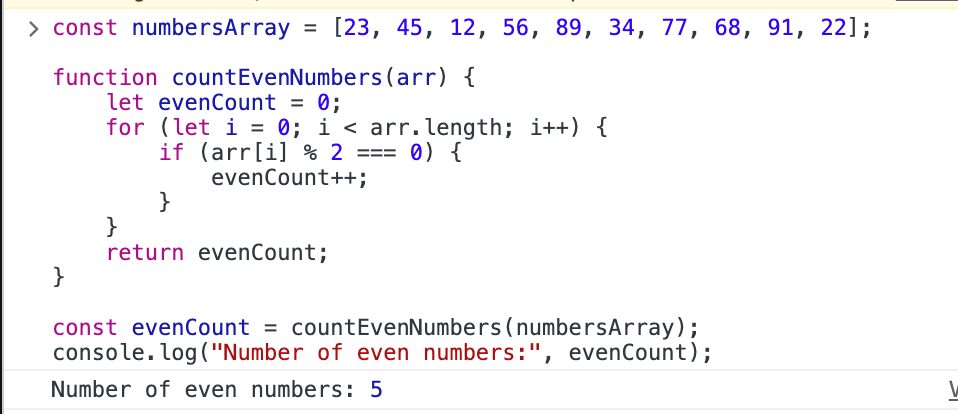
Create an array that contains ten random numbers (both even and odd). Write a function that iterates through the entire array and counts how many times an even number appears in the list. Return the count and display the output using console.log().
%%html
<script>
const numbersArray = [23, 45, 12, 56, 89, 34, 77, 68, 91, 22];

function countEvenNumbers(arr) {
    let evenCount = 0;
    for (let i = 0; i < arr.length; i++) {
        if (arr[i] % 2 === 0) {
            evenCount++;
        }
    }
    return evenCount;
}

const evenCount = countEvenNumbers(numbersArray);
console.log("Number of even numbers:", evenCount);

</script>
Console output: